How to download X (Twitter) videos with XDownloader
X (formerly Twitter) is one of the most popular social networks today, with millions of new videos and photos shared by users worldwide every day. If you're a loyal user of this social network, you've probably wanted to download your favorite images or videos from X to your device many times. And that's why XDownloader was created.
XDownloader is an online tool that runs on a web browser. It allows you to easily save and download your favorite images and videos from X (Twitter) to your phone or computer in the highest quality. The outstanding advantages of this tool are its stability, speed, and ease of use. You simply access the XDownloader.app website and use it immediately without installing any complex software.
Besides downloading photos and videos, our X downloader also lets you convert X (Twitter) to MP3 with just one click, completely free. Try our tool today to easily download your favorite X content without any difficulty.
Steps to download video X using XDownloader:
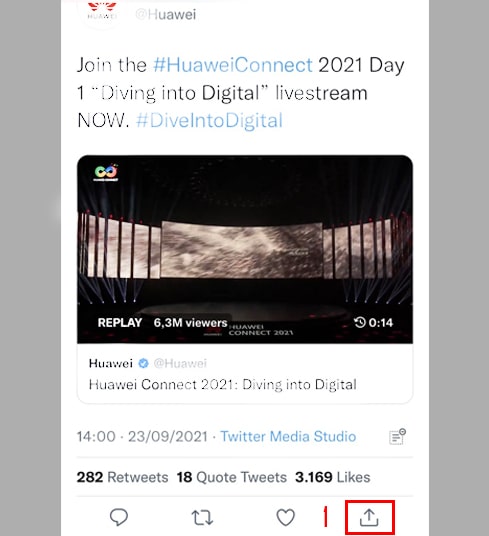
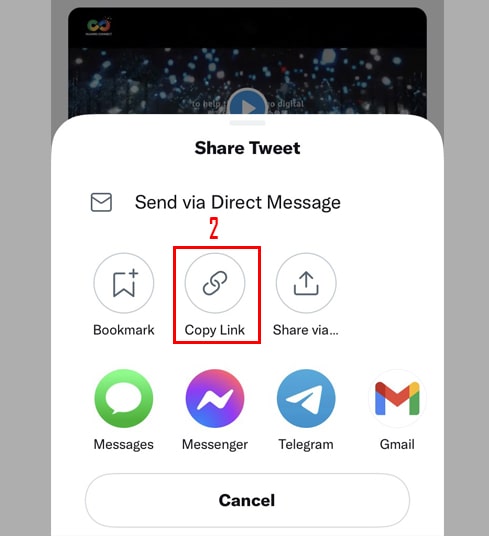
- Step 1: Open the X app, find the post containing the video you want to download. Tap the Share icon at the bottom of the post and select Copy link.
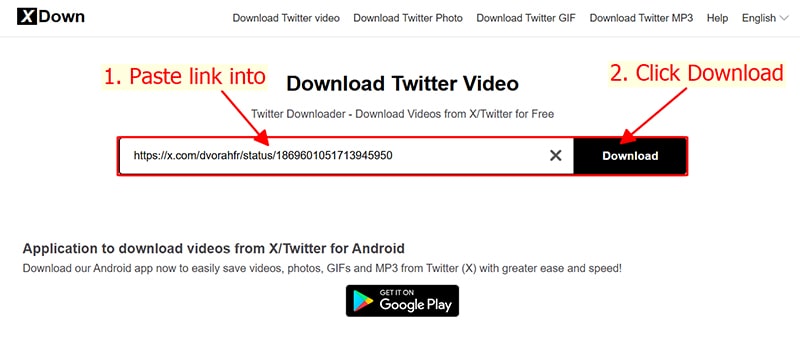
- Step 2: Open your browser and go to the website XDownloader.app, press the Paste button to enter the copied link into the search box and press the Download button.
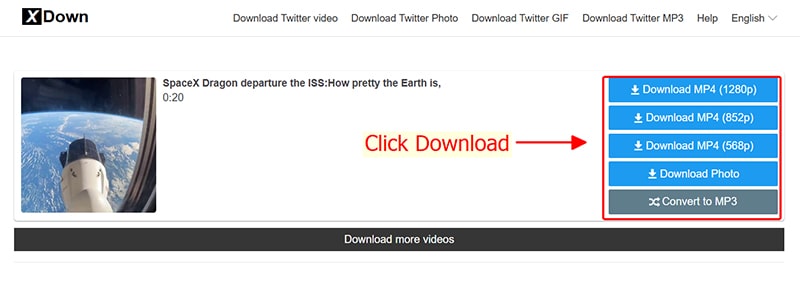
- Step 3: Finally, select your desired video quality and press the Download MP4 button to save the corresponding video to your device.
That's it! In just three steps, your favorite video from X (Twitter) has been saved to your device using the XDownloader tool. You can follow these steps to download other content from X such as photos, GIFs, and MP3s. If you find this tool effective, please share it with your friends and family so they can use it too. Thank you!
Note
- Some reasons why a post might not download include: the post is set to private, the post has been deleted, the poster's account has been locked, or the post is restricted in certain countries.
- During use, if you encounter an error, please contact us for support: contact@xdownloader.app